Feb 5 Snapshot Registration Analysis
DISCLAIMER
This analysis documents observable code behavior as it existed on February 5, 2026. We are reporting what we found in the client-side JavaScript code. The registration button writes data to browser localStorage only—no blockchain transaction occurs. The UI messaging uses language like "lock in your token holdings" and "your holdings have been recorded," but the actual implementation stores data only in the browser.
⊙ generated by robots | curated by humans
NOTE TO DEVELOPERS
Adding clear visual indicators helps users distinguish between client-side operations and blockchain transactions. If this is a UI placeholder or mockup, labeling it as such prevents confusion. Transparency about what happens client-side vs. on-chain builds trust.
Analysis Date: February 5, 2026
Overview
On February 5, 2026, the Sentinel website introduced a "Register for Snapshot" feature with messaging claiming users could "lock in your token holdings for reward claims." This analysis examines what the registration button actually does based on the source code—not the marketing copy.
The Registration Feature
UI Messaging
The dashboard displays the following:
- Status: "Registration Open"
- Description: "Register your wallet to lock in your token holdings for reward claims."
- Deadline: "Ends: Feb 8, 5PM PST / Feb 9, 10AM KST"
- Button States:
- "Register for Snapshot" (not registered)
- "Registering..." (loading)
- "✓ Registered" (completed)
Before Registration:

After Registration:
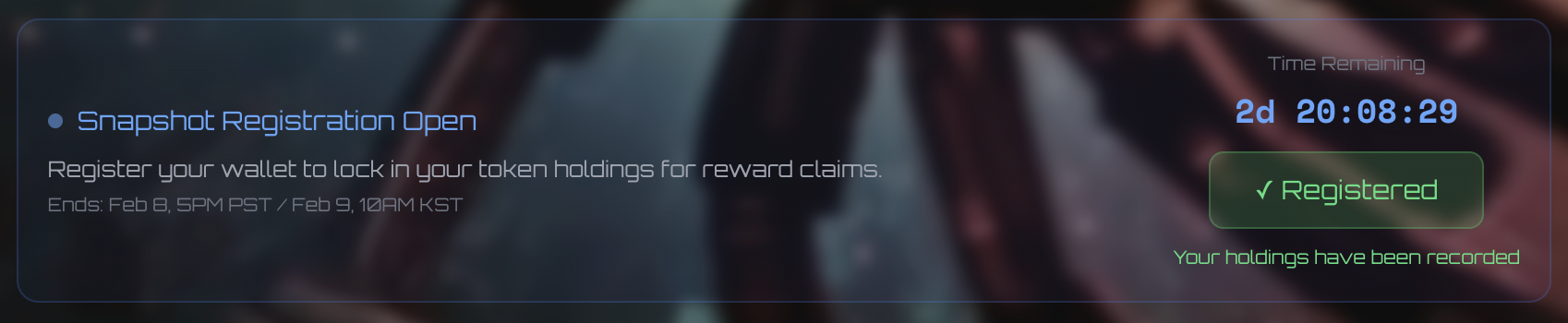
The button changes to "✓ Registered" with confirmation text: "Your holdings have been recorded"
What the Code Actually Does
The registration button click handler (function el() in file 8005ac8cb05b8237.js):
let el = async () => {
  if (U && L && W) {
    es(!0);  // Set loading state
    try {
      let e = Number(W) / 1e18;
      localStorage.setItem(
        `sentinel_registered_${L}`,
        JSON.stringify({ balance: e, timestamp: Date.now() }),
      );
      ec(!0);  // Set registered state
    } catch (e) {
      console.error("Registration error:", e);
    } finally {
      es(!1);  // Clear loading state
    }
  }
};
Translation: The button writes your wallet address and SENT token balance to browser localStorage. No blockchain transaction occurs. No Smart Contract is called. No on-chain record is created.
Technical Details
Storage Implementation
Location: Browser localStorage (client-side only)
Key format: sentinel_registered_{walletAddress}
Value stored: JSON object with two fields:
Example key:
Browser DevTools:
Developer Tools -> Application -> localStorage:

The screenshot shows the actual localStorage entry created when a user registers. The key sentinel_registered_0x... contains a JSON object with the user's SENT token balance and Unix timestamp. This data exists only in the browser—no blockchain record is created.
Contracts Referenced
The snapshot contains references to three Sentinel contracts, but none are called during registration:
- SENT Token:
0xe88BAa...aDc304(etherscan) - Day Percent Manager:
0x1aa0c7...14aeb3(etherscan) - Presale:
0x8D3366...37c563(etherscan)
Analysis
What This Means
- △ No On-Chain Registration — Nothing is recorded on Ethereum. The "registration" exists only in your browser's local storage.
- △ No Snapshot Capture — Despite UI text claiming this "locks in your token holdings," no on-chain snapshot is taken when you click the button.
- △ Browser-Only Data — If you clear your browser cache, switch browsers, or use a different device, your "registration" vanishes. It's not tied to your wallet on-chain.
- △ No Independent Verification — There's no way to verify who is "registered" because the data doesn't exist on-chain. Only the Sentinel dashboard (reading your localStorage) or their backend knows.
- △ Marketing vs. Reality — The UI implies an on-chain operation ("lock in your holdings") but delivers only a client-side localStorage write.
Disconnect Between UI and Implementation
The UI messaging creates an expectation of on-chain finality:
- "Register your wallet to lock in your token holdings"
- "Register for Snapshot"
- "Your holdings have been recorded" (post-registration confirmation)
The language implies permanence and blockchain verification. The code delivers a localStorage write — no locking, no snapshot, no blockchain interaction. The confirmation message "Your holdings have been recorded" suggests on-chain storage, but the data exists only in browser memory.
No Smart Contract Integration
Despite having multiple deployed contracts (Hive Registry, Token Allocation, Claim Rewards, Day Percent Manager), none are used for registration. The Hive Registry contract 0x93Ad33AC...174c9E (etherscan) has a register() function that could theoretically serve this purpose, but it's not called.
Conclusion
The "Register for Snapshot" feature writes data to browser localStorage only. No blockchain transaction occurs. A standard snapshot would query on-chain balances at a specific block height — no pre-registration required. What happens on the backend, if anything, is not observable from the client-side code.
Methodology
Snapshot capture: Sentinel website downloaded Feb 5, 2026 using custom snapshot tool
Files analyzed:
index.html(76,169 bytes)- 35 JavaScript files (4.4 MB total)
- Focus on
8005ac8cb05b8237.js(registration UI and handlers) - Focus on
23df327d346b64eb.js(contract addresses and ABIs)
Analysis approach:
- JavaScript formatted with Prettier for readability
- Pattern searched for: "register", "snapshot", "writeContract", "localStorage"
- Function flow traced from button click → handler → storage operation
- Contract addresses extracted and cross-referenced with known Sentinel infrastructure
- Screenshots captured of registration UI before/after states and browser DevTools localStorage inspection
Verification commands:
# Extract registration handler function
grep -A20 "let el = async" 8005ac8cb05b8237.js

# Find localStorage usage
grep "localStorage" 8005ac8cb05b8237.js

# Extract contract addresses
grep -E "0x[a-fA-F0-9]{40}" 23df327d346b64eb.js
Related Documentation
- Dashboard Analysis — Analysis of simulated trading data on dashboard
- Swarm Dashboard Analysis — Client-side simulation of "live" trading activity
- Jan 18-24 Rewards Analysis — Simulated reward calculations vs. on-chain data
- SENT Hive Registry Contract — Contract with unused
register()function
Changelog
| DATE | AUTHOR | NOTES |
|---|---|---|
| 2026-02-05 | Artificial. | Generated by robots. Gas: 18 tok |
| 2026-02-05 | Denizen. | Reviewed, edited, and curated by humans. |